Stardust AutoPlay Engine
Reviewed: Geetesh Bajaj
Product/Version: Microsoft PowerPoint 2007
OS: Microsoft Windows XP / Vista
Introduction
About Stardust Software
Download and Installation
Creating an Autorun Splash
Extra Utilities
The Actual Engine
Conclusion
Introduction
Stardust AutoPlay Engine is the new avatar of the AutoPlay Teaser Toolkit product which I reviewed in my roundup of autorun splash programs elsewhere on this site.
It's basically the same product with two important changes. First, they brought down the price to a more realistic level of $49 from as much as $149. Secondly, they now include a bonus application called WebJump as well as a full-screen version of SE32, their shell execute utility. We'll discuss these in detail later in the review.
About Stardust Software
Stardust Software, based in Redmond, Washington, USA creates several screen saver, setup, imaging and autorun products. Their Screen Saver Toolkit is among the best known screen saver creation tools.
My contact at Stardust Software for this review was Elisabeth Perrin - I wish to thank her for all her help and communication.
The Stardust Software site has more information about their products:
Download and Installation
Stardust provides a trial version of AutoPlay Engine that is functional for 10 days. The product can be purchased electronically anytime during or after the trial period. The full version of the product includes a registration code which makes the product fully functional.
Installation is a quick affair - just click the single downloaded file (trial or full version) to initiate the setup procedure. This creates a new program group in the Windows Start menu (see screenshot).
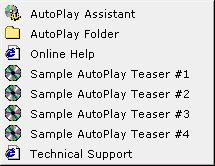
As you can see, Stardust includes four readymade samples you can try out - this is a great idea since it allows you to explore possibilities. Online help is not such a good idea since that means you have to connected to the Internet all the while.
Creating an Autorun Splash
Stardust AutoPlay Engine, as the name suggests is an engine - not a program you can use conventionally! In fact, since this autoplay engine stores its coordinates and actions in an autorun.ini file (a text file), you'll spend some time using Notepad to edit the text file (see screenshot)

Once you determine the actions and visuals for your autorun splash, you'll have to provide some bitmap images, recognized by their BMP extensions. BMP files are typically uncompressed, thus large in size - however, that's the only format that AutoPlay Engine accepts.
Once your bitmaps are ready, you'll have to record your hotspot coordinates - Stardust recommends you use Windows Paint for this purpose - you'll find more details in the online help at Stardust's web site. Suffice to say now that by entering coordinates, file names and properties in the INI file, you can create a autorun splash for your CD or DVD.
Finally, just place the AutoPlay Engine executable in the same folder as the bitmaps and the INI file along with any links as required. I've just discussed the basics here - some customization is possible through creating animated hotspots, hotspot sounds and start sounds. Online help is available at:
http://help.stardustsoftware.com/autoplay/
Extra Utilities
Stardust includes three helpful utilities as part of the package - these are:
WebJump
SE32 and SE32F
Stardust AutoPlay Assistant
The first two can be freely distributed along with the runtime engine on finished autorun CDs.
WebJump, when accessed from the Autorun.ini file allows you to link a website to a hotspot.
SE32 and SE32F are shell execute utilities that run associated programs for file types using the shell values stored in the Windows registry - thus if you shell execute a file with the DOC extension, you can be reasonably assured that an instance of Microsoft Word on the client system will load with the file. Whereas SE32.exe is a basic shell execute program, SE32F.exe runs activated applications full screen.
Another bundled utility, the Stardust AutoPlay Assistant can enable or disable autorun for all your removable, fixed and remote disks - there's no doubt that this feature can prove very helpful for testing purposes.
The Actual Engine
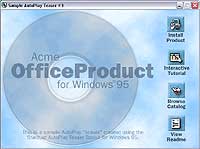
Stardust does point out that their autorun executable weighs only 55 kb and requires no operating system DLLs. The entire runtime is written in tight "C++" code to minimize size and maximize loading speed.
The end product is capable of running on all operating systems from Windows 95 through Windows XP.
Also, the cost of the product includes all royalties required to distribute the runtime product.

Conclusion
Stardust provides several support options including email support, online FAQs and peer-to-peer forums.
I would have been critical of this product at a price point of $149 (which was the case two years ago), but at $49 this seems so much more of a good deal. Its main asset is its compact runtime engine that is not dependent on external DLLs and runs across the entire gamut of 32 bit Windows based operating systems. I could probably also live with no options other than BMPs for visuals - but I certainly wish they had provided a hotspot editor.
Finally, the three bonus utilities are very helpful indeed - and would go a long way in improving your autorun experience.


