
This is the print version of this page. All content is copyright Indezine.com 2000-2026.
Explore AbleStock, a stock photo site from Hemera.
Author: Geetesh Bajaj
Product/Version: PowerPoint
A Reason - A Purpose
About Hemera
About AbleStock
Register At AbleStock
Searches And Lightboxes
Managing Your Account And LightBoxes
Pricing & Support
In Conclusion
There are umpteen web based repositories of clip media, where you can download as much as you want during a fixed subscription period. However, as a rule of thumb most of these sites contain either simple vector clipart or low resolution images. Although their raison d'être dwells more on quantity than quality, customers are often satisfied because a flat subscription rate covers unlimited downloads.
On the other end of this scale are vendors of high resolution images, where you can choose individual pictures to download (or request a printed catalog) for a certain amount per image. The content on these sites is first rate, but costs are certainly prohibitive.
It is surprising no vendor of high resolution images has ever come up with a business model that treks the middle path: a site where users could download any number of quality images over a certain period to provide a higher ROI rate. Enter AbleStock from Hemera Technologies.

You might want to take a look at the AbleStock site before we discuss further.
BackHemera Technologies is a Gatineau, Ottawa based entity whose most famous foray in clip media has been through its Photo-Objects™ range (see separate review). Currently, Hemera provides more than 100,000 Photo-Objects™, and new ones are created on a continuous basis. Needless to add, Photo-Objects™ has been the harbinger of Hemera's success story since it was founded in 1997.
Since then, Hemera has strengthened its foundations in the clip media market. Most significantly, Corel Corporation bequeathed its clip media interests to Hemera in exchange for a 23% stake in the company on July 17th, 2001. More info at:
Hemera's other success stories include the GraphicsDesk.com website (see separate review) and 'The Big Box of Art' (see separate review) clipart collections. Take a look at Hemera's site for more info:
BackThe content at AbleStock is of two types - stock images and high-res Photo-Objects™.
Stock images are professional photographs available in three resolutions (maximum dimensions and pixels mentioned for square images):
Rectangular (35 mm) images are also available in similar resolutions:
In addition, small comp images are available free for all the 15,000 images that can be previewed online.
The Photo-Objects™ available here are high resolution versions of actual Photo-Objects™ for professional use—again available in three resolutions - large, medium and multimedia. All Photo-Objects™ are pre-masked.
All content can be downloaded using a 'membership' model. Alternatively, you can also pay for individual images to download. For all practical purposes, we'll discuss the membership model in this review.
BackTo procure any content from AbleStock, you need to register. This is a one-time process. You need to provide basic information like name, email address, password, country, etc. The email address automatically becomes your login ID.
Thereafter you can always log-in to change your profile or password. You can also view your purchase history, and also re-download purchased images anytime repeatedly.
An AbleStock membership for 6 months or 1 year can be purchased online through credit card on a secure server.
BackSearches are through keywords or combinations of keywords. Results are displayed as thumbnail pages (see screenshot below). You can further fine-tune the results by entering new keywords and searching within existing results.
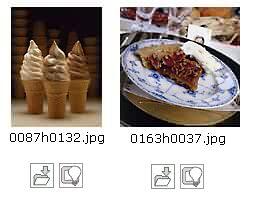
For my example, I searched using the keyword 'dessert'. Results included 41 images, all displayed on 2 pages. Each image has two buttons below. One of them provides a comp image, price and specifications while the other adds your selection to a new or existing lightbox. So, what is a lightbox? To anyone used to procuring images from stock image vendors, lightboxes may be as familiar as pixels. But for anyone else, there's no mention of a 'lightbox' in the Glossary page onsite. The FAQ page is not very helpful either.
Once you click on the lightbox button, a popup window prompts you to add the image to new or existing lightbox, basically something between a project and a folder.
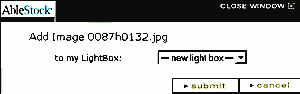
When you create a new lightbox, you are prompted to add a unique name along with Client and Project names. Thereafter, you can continue inserting more images within your lightbox. Such lightboxes can be emailed. This actually sends a unique URL that displays the content of your lightbox.
BackYou can access your lightboxes whenever you log-in into your membership at AbleStock. The following screenshot shows the top left of your browser screen before log-in:

The following screen shows the same area after log-in:

As you can see, the log-in and register buttons have been replaced by the My Account and My LightBoxes buttons.
The My Accounts screen allows you to change your password, profile and search preferences. You can also view your purchase and download history.
The My LightBoxes screen is actually the pulse of the AbleStock site. All important tasks, such as managing your collections, sending URLs for preview and actually downloading the images is accomplished from here. Beneath each image thumbnail, there are three icons (see the bottom screenshot).

The first icon allows you to purchase and download the image (not required if you are a member). The second icon opens the price and specifications popup window (contains direct download links for members). Finally, the third icon allows you to remove the image from the current lightbox.
Non-members can directly download the image after paying online through credit card on a secure server.
BackSubscriptions are currently (September 2002) priced at US$399 for 6 months, and US$699 for a year. You are also provided a complimentary annual membership to NAPP (National Association of Photoshop Professionals).
Single images can be purchased at US$ 24.99 for multimedia resolution, US$69.99 for medium and US$129.99 for large resolution.
Support options include a comprehensive FAQ and Glossary. Further support is through telephone or email.
BackThe quality of the content is certainly of top calibre—combined with an excellent customer-friendly interface, a reasonable search facility and good support. All put together, AbleStock is certainly a winner.
BackYou May Also Like: Presentation Studio, Australia: Conversation with Emma Bannister | Prison PowerPoint Templates


Microsoft and the Office logo are trademarks or registered trademarks of Microsoft Corporation in the United States and/or other countries.
