
This is the print version of this page. All content is copyright Indezine.com 2000-2026.
Explore ESchoolMaps, a collection of maps ready to use within PowerPoint.
Author: Geetesh Bajaj
Product/Version: PowerPoint
Introduction
About ESchoolMaps
The CD
Using Maps
Pricing and Support
Conclusion
If you are a PowerPoint creator such as a designer, teacher, or someone who creates PowerPoints in the office, you know that getting a good quality map into PowerPoint is not the easiest of things you can do. It might involve buying some expensive maps that come only in EPS or Adobe Illustrator formats. Again these open only in Adobe Illustrator or any of the other few high-end graphic applications that are more oriented towards professional graphic designers rather than PowerPoint creators.
And even if you manage to go so far, you still need to get your maps into PowerPoint - for that you will need to export to a graphic file format that PowerPoint understands. And then you'll discover that none of those maps can be easily edited using PowerPoint's own tools. By this time, you probably give up the whole idea of using a map in your presentation!
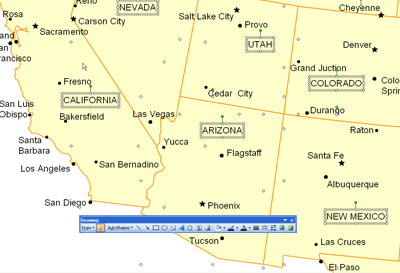
That's the reason I was so happy to see a collection of maps that were actually PowerPoint presentations. Let us explore more.
BackESchoolMaps is a Boston, USA based company that offers a CD-ROM based collection of maps for PowerPoint use that I am reviewing here. in addition, they also provide the same maps in EPS and JPEG formats.
My contact at ESchoolMaps was Bruce Jones - thank you, Bruce.
You can learn more about ESchoolMaps, buy their CD-ROM, and download free sample maps from their site.
BackThe CD contains several map categories such as:
Each of these categories on the CD comprises editable PowerPoint and EPS maps apart from flat JPEG images. We explore these formats next.

The ESchoolMaps CD-ROM contains maps in these formats:
Maps CD ROM is a collection of maps available in different file format which are:
The ESchoolMaps CD-ROM can be purchased directly from their web site through secure online server, and by mail or fax. Multiple license options are also available for institutions like schools and large businesses. The CD-ROM costs $39.95. Shiiping is free for US customers although international shipping costs $10.
Support is through an extensive online FAQ, email and phone support is available as well.
BackSeveral sites online sell maps for hundreds of dollars, yet this entire CD costs you $35. While this collection might not have the quality of some high-end cartography, this might be just what you need in 95% of the situations. While their site recommends these maps for schools, there's no reason why any business can't use these maps to show sales, potential, or even geography in a PowerPoint presentation. This is a great product at an amazing price.
BackYou May Also Like: 3D Content Guidelines for Microsoft: Conversation with Michelle Maislen and Jeremy Kersey | Concepts (Worldwide) PowerPoint Templates


Microsoft and the Office logo are trademarks or registered trademarks of Microsoft Corporation in the United States and/or other countries.
