Indezine Home
PowerPoint Stuff PowerPoint Stuff
Indezine Home
  Home PowerPoint Photoshop Photos Other Studio Info
  Templates Blog Ezine Addins Learn Cool Personality Listings Members Notes Bank Articles
    This is the print version of the page.


Home | Products | Expression

Creating Spirographs with Microsoft Acrylic

by Geetesh Bajaj , November 23rd 2005

line

Here's how you can make a spirograph in Microsoft Acrylic:
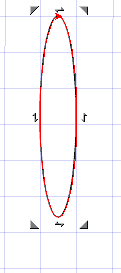
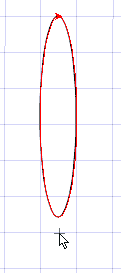
  1. Create a new document in Acrylic and draw any shape. For this tutorial, I selected the Ellipse tool (keyboard shortcut R) and drew a longish oval as you can see in Figure 1.

    Remember that the R shortcut key toggles between the ellipse and rectangle tools.


    Figure 1

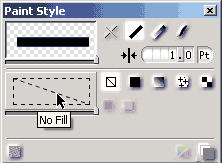
  2. Make sure that the oval has no fill attributes. This can be checked in the Paint Style palette as shown in Figure 2.


    Figure 2

  3. Make sure your oval is selected, and them click on the Rotate tool (or activate it with the keyboard shortcut Shift+R) from the tool bar. Now click outside the oval area to set an anchor point as you can see in Figure 3.


    Figure 3

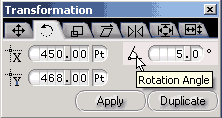
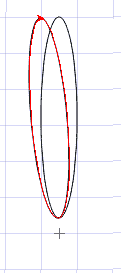
  4. Once this anchor point has been determined, Go to Transformation palette (see Figure 4) and set the rotation angle. I set the rotation angle to 5 degrees and clicked on the duplicate button to create the graphic that you can see in Figure 5.


    Figure 4


    Figure 5

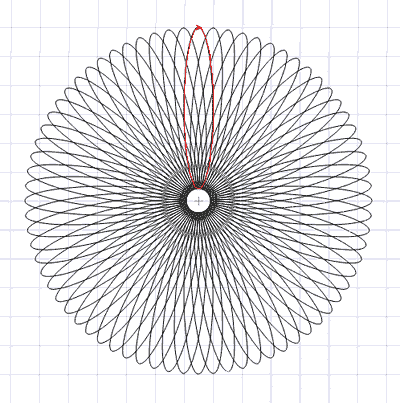
  5. Keep clicking the Duplicate button on the Transformation palette to add more overlapping copies to complete your spirograph. Figure 6 shows the completed spirograph.


    Figure 6

  6. Save your spirograph to a file.

Back


AddThis Social Bookmark Button     Save as PDF


Clip Media: ClipMedia Index | AbleStock | AbsolutVision | Big Box of Art | ESchoolMaps | Professor Franklin's | Free Images/Textures | GraphicsDesk | Image Express | Photo-Objects | Photo-Objects Vol III | PowerDESIGNS. Creating Backgrounds: Reticulation Effects | Photo-Brush Triangulars | Dingbats in Photoshop | TIFF with Channel | Shapes From Illustrator | Corel Painter. Creating Graphics: Expression PNGs | Spirographs | Photoshop TIFs | Xara PNGs | Corel PhotoPaint | Macromedia Fireworks. Ideas: 11 Steps To Presentations | Fullscreen in Flash | Creativity Un-Block | Using Copyrighted Material | Editable Charts | Unblocking Creativity | Color Combinations | Presentation Colors | Color Theory | Visuals. Sound Stuff: Sound Index | Sound Conversion | Sound Codecs | MIDI to WAV Realizers | SoundFonts | Sound Fades. Resources: Animated GIFs | Background Tiles | Fonts. Autorun Stuff: Autorun Splashes | Stardust AutoPlay.


   Home |  PowerPoint |  Photoshop |  Templates |  Blog |  Notes |  Ezine |  Studio |  Advertise |  Feedback |  Info |  Site Map
Store  |  RSS |  Privacy |  Testimonials
Free PowerPoint Backgrounds | Free PowerPoint Templates | Free Christian PowerPoint Backgrounds

  ©2000-2008, Geetesh Bajaj. All rights reserved.
    since November 02, 2000