This is the print version of this page. All content is copyright Indezine.com 2000-2026.
June 2, 2026
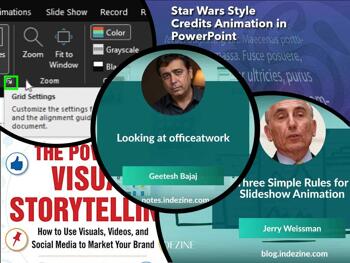
In this issue, we explore how thoughtful presentation design is often built on the details people rarely notice—but always experience. We begin with three simple rules for slideshow animation, showing how movement can guide attention and support storytelling without overwhelming the audience. We then take a closer look at officeatwork, where productivity, brand consistency, and smarter workflows come together to help organizations create polished presentations more efficiently. Finally, we revisit PowerPoint’s snap-to-grid settings, a subtle yet powerful feature that helps maintain alignment, balance, and visual precision. Together, these stories remind us that great presentations succeed when creativity is supported by structure, consistency, and intentional design.
Stay updated with the latest tutorials, tips, and news on PowerPoint and presentation techniques.

You get 8 shape types plus lines as part of this Organic Shapes collection. Each of these 8 shape types have 10 variants. So you end up with 80 hand-drawn shape options! Again each of these 80 shapes have 12 brush stroke styles! Plus you get the lines and arrows in 12 brush stroke styles too. Combine all variations to end up with more than 3000 possibilities.
December 5, 2025

Boris Hristov is the Founder of presentation agency 356labs and a PowerPoint MVP. He has presented in 25+ countries and has been rated as the top speaker numerous times. Boris has years of experience as a trainer, mentor and consultant and works with many companies to help them craft and deliver truly effective presentations. In this conversation, Boris discusses the upcoming Present to Succeed 2026 online conference, being held in-person and online in London on May 21st, 2026, and in Sofia on June 12th, 2026.
Inserting a New Slide with Copilot in PowerPoint 365 for Windows
June 3, 2026

Mastering alignment is one of the simplest ways to elevate the professionalism of your PowerPoint slides, and Snap to Grid is a feature designed precisely for that purpose. This guide explains how PowerPoint’s grid system works, why it matters, and how snapping can help you position shapes, pictures, and text with greater accuracy.
Learn to use the Snap to Grid option in PowerPoint 365 for Windows.
May 28, 2026
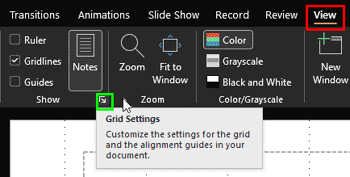
Once you turn on Gridlines in PowerPoint, you might think they are nothing more than a set of faint lines spread across your slide. It’s almost like graph paper from your school math notebook. And honestly, that first impression is not entirely wrong. Gridlines do give you a visual framework that helps you place pictures, shapes, and text boxes more neatly.
Learn how gridlines snap and help you position slide objects in PowerPoint 365 for Windows.
May 27, 2026

officeatwork brings a fresh, structured way for organizations to create brand consistent documents in Microsoft 365, helping teams stay visually aligned and professionally polished. Designed to support organizations of all sizes, officeatwork streamlines communication, supports team collaboration, and helps maintain brand compliance at scale.
May 26, 2026
In this issue, we focus on how precision and structure shape more effective presentations. We begin with a conversation with Laszlo Diewald about Gantt charts in presentaid, where project timelines become clearer, more visual, and easier to communicate to teams and stakeholders. From there, we revisit two often-overlooked PowerPoint essentials: rulers and gridlines. While simple on the surface, these tools help presenters align objects accurately, maintain balance, and create slides that feel polished and professional. Together, these stories highlight an important principle: whether you are managing projects or designing slides, clarity emerges when information is carefully structured, visually aligned, and thoughtfully presented.
Stay updated with the latest tutorials, tips, and news on PowerPoint and presentation techniques.
Microsoft and the Office logo are trademarks or registered trademarks of Microsoft Corporation in the United States and/or other countries.