This is the print version of this page. All content is copyright Indezine.com 2000-2026.
October 26, 2026

As a student of Argentine Tango, I compare establishing rapport to starting to dance with a new partner. The couple walks to the floor. They get in the dance position, BUT they don’t immediately start dancing. They may mark the step and not move, or they may just stand there and feel each other’s internal rhythm. Then, when the leader feels connected, the dance starts.

You get 8 shape types plus lines as part of this Organic Shapes collection. Each of these 8 shape types have 10 variants. So you end up with 80 hand-drawn shape options! Again each of these 80 shapes have 12 brush stroke styles! Plus you get the lines and arrows in 12 brush stroke styles too. Combine all variations to end up with more than 3000 possibilities.
September 8, 2026

Troy Chollar is co-founder and a Sr. Designer of TLC Creative Services and awarded by Microsoft as an MVP for PowerPoint for 24 consecutive years. For more than two decades, Troy has helped organizations create presentations ranging from executive briefings and sales decks to large-scale live event experiences. A regular presenter at The Presentation Summit (he was an attendee at the very first conference!), host of The Presentation Podcast, and the voice of ThePowerPointBlog, Troy is passionate about sharing practical PowerPoint techniques, animation strategies, and workflow improvements that presentation professionals can immediately apply to their own projects. In this conversation, Troy talks about the upcoming Presentation Summit 2026, being held virtually from September 13 to 16, 2026.
Inserting a New Slide with Copilot in PowerPoint 365 for Windows
October 23, 2026

In a 2001 article in Small Business Computing, writer Angela Garber expressed the universally negative reputation of cluttered slideshows by coining the frequently cited epithet, Death by PowerPoint. Given the constant disparagement of slideshows by critics, audiences, and even by presenters themselves, why would anyone continue to use them?
October 20, 2026
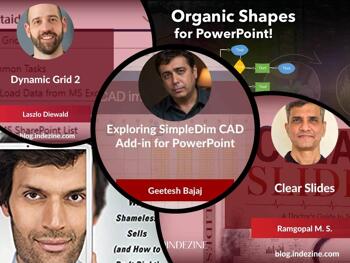
This issue is about doing the job properly the first time. SimpleDim brings real measurements into PowerPoint, so a warehouse layout or a floor plan on a slide is not just a picture but an actual, to-scale drawing you can trust. Laszlo Diewald’s Dynamic Grid 2 does the same for data: one click refreshes your table straight from SharePoint, so the numbers in the room are always the current numbers, not last week’s. And Ramgopal’s book, Clear Slides, makes the same argument about thinking: organize your ideas before you open PowerPoint, because a clear head makes a clear slide. Three different tools, one simple rule: get it right early, and the rest gets easier.
Stay updated with the latest tutorials, tips, and news on PowerPoint and presentation techniques.
October 19, 2026
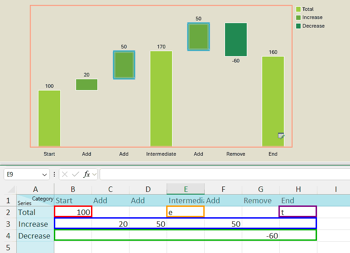
Here is a question worth sitting with: why does one of the most widely used chart types in consulting still require a workaround in PowerPoint? This tutorial walks you through a better way to create waterfall charts, using Ampler or Ampler Charts. Yes, native PowerPoint includes a basic waterfall chart option, but it falls short where it matters most: customization and waterfall chart variations. Ampler addresses all of that, and by the end of this tutorial, you will see exactly how.
October 15, 2026

Laszlo Diewald has been working as a consultant for more than 10 years now. He started his career as an employee right after his study at the Technical University of Munich. Shortly after, he decided to become self-employed as a freelance consultant. In 2017, he founded his own consultancy, with a focus on large scale projects in the financial sector. In parallel, he started working on presentaid, which was finally launched in April 2022. In this conversation, Laszlo talks about presentaid’s new Dynamic Grid 2.
Microsoft and the Office logo are trademarks or registered trademarks of Microsoft Corporation in the United States and/or other countries.